

A copier that stops working mid-morning in a Bronx medical office or law firm is not a minor inconvenience. It is a direct hit to billing runs, client filings, and every document-heavy task your staff depends on to finish the day.
ABC Computer Services helps Bronx businesses get their commercial copy equipment back online with trained technicians, stocked service vehicles, and a repair process built around minimizing how long your office sits idle. This guide breaks down what professional copier repair looks like in the Bronx, what drives most failures, and how to read a service agreement before you sign one.
Key Takeaways
- Most Bronx office copier failures trace back to five root causes: worn paper-path rollers, fuser assembly wear, drum or imaging-unit degradation, scanner mechanism faults, and network or driver conflicts.
- A technician who arrives without the right fuser, belt, or feed roller is delivering an inspection visit, not a repair. Always ask a prospective provider what parts they carry on the truck.
- Preventive maintenance visits catch wear items before they cause a hard stop, reducing the frequency of emergency calls and the cost that comes with them.
- Service agreements that include scheduled maintenance and labor coverage give Bronx offices predictable repair costs instead of unpredictable emergency invoices.
Why the Bronx Needs Dedicated Copier Repair Expertise
The Bronx is home to a wide range of document-intensive businesses: outpatient clinics, legal aid offices, real estate firms, nonprofit organizations, and borough-based government contractors. Each of these operations relies on multifunction copiers that must print, scan, fax, and copy throughout the workday without interruption.
When a device fails, the ripple effect is immediate. Staff cannot print insurance forms, attorneys cannot scan exhibits, and front-desk workflows that depend on a single shared device come to a full stop until a qualified technician arrives.
Choosing a repair provider that already understands commercial-grade equipment, carries common replacement parts, and can dispatch to Bronx addresses quickly is the difference between a one-hour interruption and a two-day work stoppage. That decision matters most during high-volume periods like month-end billing or open enrollment seasons.
ABC Computer Services is based at 127 W 30th St, New York, NY, and serves commercial clients who need reliable, professional equipment service. Familiarity with the makes and models common to Bronx offices means fewer second visits and faster diagnosis on the first.
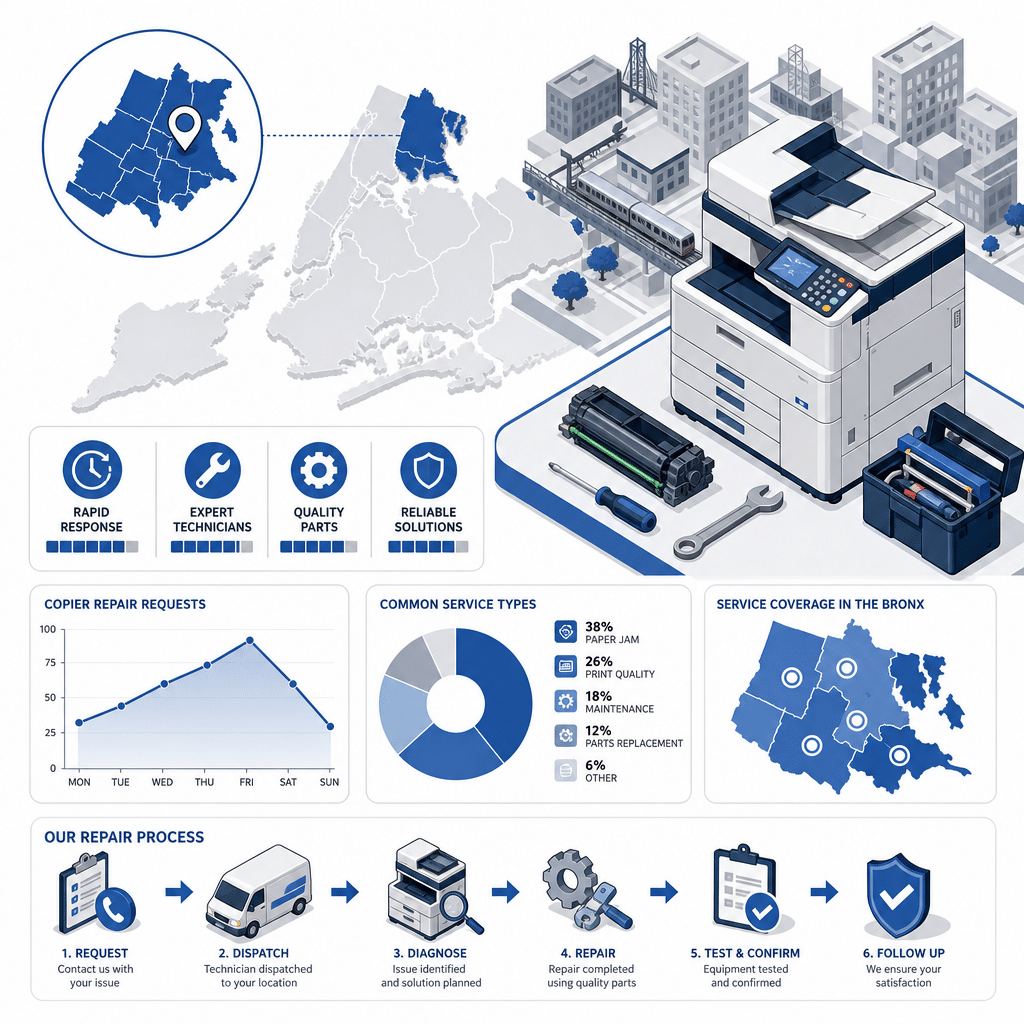
Bronx Copier Repair: Service Types, Turnaround Times, and Coverage Overview
Turnaround times reflect typical scenarios and vary based on parts availability, device model, and service volume at time of call. Contact ABC Computer Services directly for scheduling.
The Five Most Common Copier Failures in Commercial Offices
Paper-path jams are the most reported symptom across commercial office environments, and they are almost never caused by the paper itself. Worn pickup rollers, degraded separation pads, and humidity absorbed by improperly stored paper stock are the real culprits, and replacing the worn component is the only lasting fix.
Fuser assembly failures are the second most frequent hard-stop failure type. A fuser heats toner and bonds it to the page, and once it degrades past its rated page count, output becomes wrinkled, smeared, or light before the machine throws an error code entirely.
Drum and imaging-unit wear shows up gradually as streaks, faded bands, or repeating marks on every printed page. Most drums carry a manufacturer-rated page life, and a technician who tracks that counter during preventive maintenance can replace the unit before it causes a service call.
Scanner mechanism faults prevent scanning, emailing, and copying functions even when the print engine still works. A misaligned mirror, a dirty glass platen, or a failed scanner motor can disable the entire multifunction workflow while the rest of the machine operates normally.
Network and driver conflicts are increasingly common as offices upgrade their IT infrastructure without updating copier firmware. A copier that printed fine last week may become invisible on the network after a router replacement or operating system update, and resolving it requires someone who understands both the device and the network layer.
What the Copier Repair Service Process Looks Like
A professional service call begins with triage. When you report the symptom, the error code, and the model, a dispatcher can route a technician who already knows that machine and can stock the vehicle accordingly.
Skipping triage means the technician arrives with generic tools but not the specific fuser or roller your model requires.
On arrival, the technician performs a diagnostic check that goes beyond the reported symptom. A copier that jammed may also have a worn pickup roller that has not yet caused a hard stop, and catching that secondary wear item during the same visit avoids a repeat call within a few weeks.
Parts replacement, cleaning, and a test print sequence complete the visit. The technician should document what was replaced, what was observed but not yet critical, and what the recommended next maintenance window is, so your office has a written service record rather than a verbal summary.
That written record matters when a device is approaching end of life. A technician who can show you a pattern of escalating repair frequency is giving you the data to decide whether a repair or a replacement is the smarter investment at that point in the machine’s cycle.

Preventive Maintenance vs. Break-Fix: A Practical Comparison
Break-fix service means you call when something breaks and pay for each visit. It is the lowest upfront commitment, but it also means every failure is an emergency, every repair is unplanned, and your staff absorbs the downtime while you wait for a technician to become available.
Preventive maintenance contracts schedule regular technician visits to clean, lubricate, inspect, and replace wear items before they cause a failure. The cost is predictable, the downtime windows are scheduled rather than random, and the machine’s overall reliability improves across the contract period.
Unplanned downtime is a persistent operational challenge across facilities that depend on shared equipment, as documented in the Plant Engineering 2026 State of Manufacturing Operations and Maintenance Study (2026), which found that aging equipment and mechanical failure are among the leading causes of unplanned downtime in facilities that rely on shared operational assets. While that study covers industrial environments, the underlying mechanical wear patterns it identifies apply directly to high-cycle commercial copiers in busy offices.
A service agreement that bundles labor, parts, and scheduled maintenance into a single monthly or annual cost removes the guesswork from your equipment budget. It also creates an ongoing relationship with a technician who knows your specific machines, which speeds up every subsequent visit.
How to Read a Copier Service Agreement Before You Sign
Response time language is the first clause to examine. Some agreements promise a technician on-site within a defined window, while others only commit to a phone callback or a next-available slot.
The difference between those two is the difference between same-day resolution and a two-day wait.
Parts coverage is the second critical term. An agreement that covers labor but excludes high-cost wear items like fusers and drums can still produce large out-of-pocket bills.
Confirm whether the contract covers parts at cost, at a marked-up rate, or as included in the flat fee.
Escalation clauses matter for older machines. A well-written agreement will specify what happens if the same failure repeats within a defined period, whether a loaner device is available during extended repairs, and at what point the provider will recommend replacement rather than continued repair.
Finally, review the cancellation and renewal terms carefully. Auto-renewing contracts with long notice windows can lock your office into a service relationship that no longer fits your equipment mix.
A clear, short cancellation window with written notice requirements protects your business as your copier fleet changes.
Brands and Equipment Types Serviced in the Bronx
Commercial copier repair in the Bronx covers a wide range of multifunction device brands, including the makes most common in medical offices, law firms, and mid-size business environments. A qualified service provider should be able to name the specific models they service before you schedule a visit, not after the technician arrives and discovers the machine is outside their experience.
High-volume devices used in print shops or large administrative offices require technicians with experience in production-class equipment, which has different fuser temperatures, paper-path designs, and drum geometries than standard office-class machines. Confirming that your provider has hands-on experience with your specific volume class prevents misdiagnosis and unnecessary parts replacement.
Legacy equipment is also common in Bronx small businesses that purchased their machines outright and have run them well past the manufacturer’s standard support window. Repairing these devices requires access to aftermarket parts and a technician experienced enough to work without manufacturer diagnostic software.
ABC Computer Services handles multifunction copiers across a range of makes and volume classes. Providing the model number and the reported symptom when you call allows the team to confirm fit before scheduling, so you do not pay for a visit that ends without a repair.
Frequently Asked Questions
How do I know if my copier needs repair or replacement?
A reliable signal is the ratio of annual repair costs to the current replacement cost of the machine. When repairs in a rolling 12-month period approach or exceed 50 percent of what a comparable replacement device would cost, most service professionals recommend replacement rather than continued repair.
A technician who has a documented service history for your machine can help you make that calculation with real numbers rather than guesses.
What information should I have ready when I call for copier repair in the Bronx?
Have the brand name, model number, and the exact error code or symptom description ready before you call. That information lets the dispatcher route the right technician and stock the vehicle with parts that match your machine, which reduces the chance of a second visit for parts that were not on the first truck.
Does ABC Computer Services offer service agreements for Bronx businesses?
Yes, ABC Computer Services offers service agreements that cover scheduled preventive maintenance and repair labor for commercial copier equipment. Contact the team at 127 W 30th St, New York, NY, to discuss the agreement options that fit your equipment and usage volume.
Why does my copier keep jamming even after the paper path was cleared?
Recurring jams after a cleared obstruction almost always point to a worn mechanical component rather than the paper itself. Pickup rollers, separation pads, and registration rollers all degrade over time and begin slipping or misfeeding before they cause a hard stop, and replacing the worn part is the only way to stop the cycle.
What is the difference between a fuser error and a drum error on a copier?
A fuser error typically produces wrinkled, smeared, or unfused toner on the output page, or a temperature-related hard-stop error code, because the fuser assembly has degraded or failed. A drum error usually shows up as repeating streaks, bands, or ghost images on every page, caused by surface wear or contamination on the imaging drum itself, and the two components require completely different replacement procedures.